
Run the call.
SmartCues takes the notes.
Qualification, next steps and a follow-up email, tracked live on every sales call, with the buyer's own words as evidence. No bot joins the call.
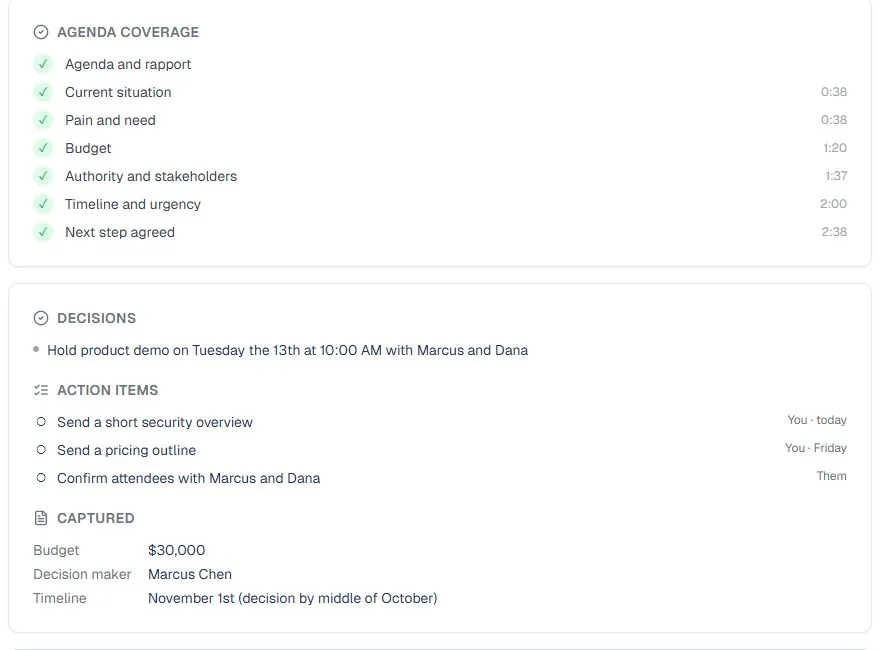
What a Discovery Call Leaves You With
From an example call: decisions, owners and dates, all pulled from what was said.

Set Up Once. Then Just Take the Call.
Connect a calendar, and SmartCues suggests the right template for each meeting.
Step 1: Start from your calendar
SmartCues reminds you before each call and suggests a template from the title, like Discovery (BANT) for a call with “discovery” in its name.
Step 2: Tell the buyer
A line in the invite, a message for the chat, or a sentence to say aloud. SmartCues doesn't join as a bot, so it asks you to be open about using it.
Step 3: Take the call, then send
The lists fill in while you talk. Afterwards, send the follow-up and the CRM note, or share a summary link.
Less Typing. Fewer Dropped Follow-Ups.
What you get on every sales call.
Qualification tracked as it is said
Discovery (BANT), Qualification (MEDDIC) and Demo and close templates keep the framework in front of you. Budget, decision maker and timeline are captured with the exact words that support them.
Next steps that don't slip
Every promise on the call becomes an action item with an owner and a due date when one was said: the security overview by today, the pricing outline by Friday.
Pains in the customer's words
The summary quotes what the buyer actually said about the problem, and lists the qualification gaps you still need to close.
A follow-up ready before your next call
An email draft to the attendees, with what was agreed and the next steps with owners. Edit it, then send it from your own mail.
A note in your CRM
Send the summary and action items as one note on every contact whose email matches an attendee. Sending again updates the same note. HubSpot and Salesforce are on the way.
Your notes stay yours
Your own notes are reflected in the summary. Your score, the tone of the call and any coaching are private, and are never shared or sent to a CRM.
No bot in the call. Nothing hidden from the buyer.
Buyers notice a bot in the call, and some of them object. SmartCues has none, and it makes sure you say you're using it before anything is transcribed. That keeps the conversation easy, and it makes it simple to meet your own recording obligations.
Audio stays on your computer
The desktop app transcribes and records on your computer by default. Nothing is uploaded unless you choose it.
You pick what is kept, and where
Audio, transcripts and summaries: on your computer, in your account, or never kept. Transcripts in your account are deleted after 7, 30, 90 or 365 days.
Never used for training
We don't use your calls to train AI models.
Finish the call. The notes are done.
Free during our launch phase. No credit card.