
Know what was decided
before the call ends.
SmartCues listens to your meeting and keeps the agenda, questions, decisions and action items up to date as you talk. Then it writes the summary and the follow-up email. No bot joins your call.
On Windows? Download the desktop app

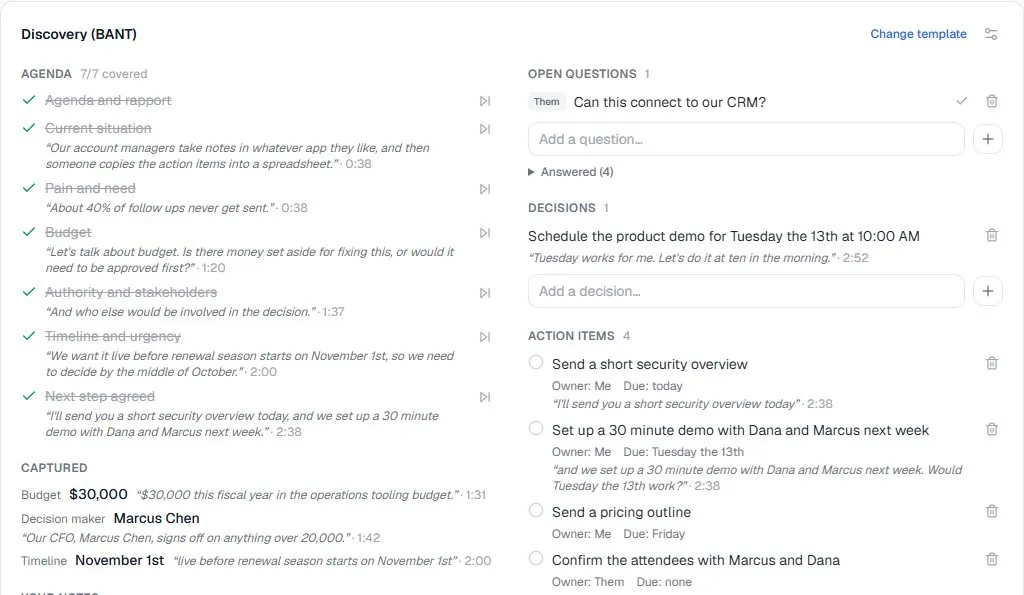
Four Lists That Write Themselves
Stay in the conversation. SmartCues keeps the record, and every item points back to the words that produced it.
Agenda
Topics tick themselves off as they come up, with the moment they were covered.
Questions
Who asked what, and whether it was answered. Open ones stay visible until they are.
Decisions
What was agreed, in plain words, with the sentence that shows it.
Action items
Each with an owner and a due date when one was said. Tick them off as they get done.
Each item carries a verbatim quote and a timestamp, checked against the transcript before it is added. Anything you edit or dismiss stays the way you left it. Your own notes sit beside the lists, and they end up in the summary.
From Calendar Invite to Follow-Up
Three steps, and the last one is automatic.
Step 1: Pick the kind of meeting
SmartCues suggests a template from the title and attendees, and never applies it without your click. The template decides the agenda, what to capture, and how the summary is written.
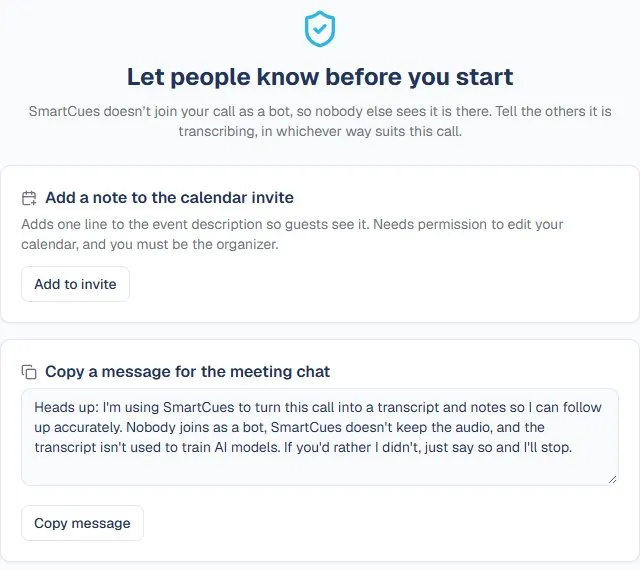
Step 2: Tell the others
Nothing is transcribed until you have let people know, with a line in the invite, a message for the meeting chat, or a short script to say aloud.
Step 3: Talk. SmartCues keeps track.
The lists update while you speak. When you end the call, the summary and the follow-up email are ready.
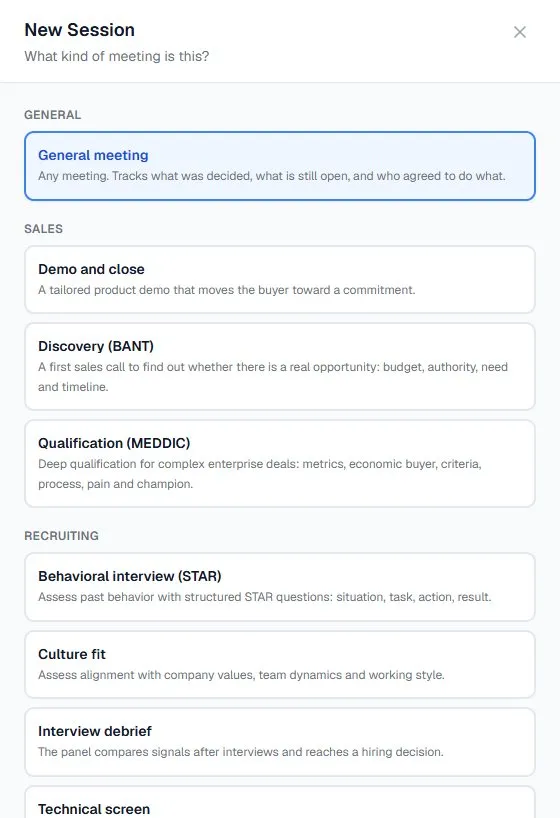
A Template for Every Kind of Meeting
55 ready-made templates. Each one knows what its meeting needs to produce.
Sales
Discovery (BANT), Qualification (MEDDIC), Demo and close
Customer
Client check-in, Onboarding kickoff, Quarterly business review, Escalation call
Recruiting
Behavioral interview (STAR), Technical screen, Culture fit, Interview debrief
Project
Project kickoff, Weekly status sync, Standup, Retrospective
Leadership
1:1, Strategy session, Fundraising pitch, Investor update
Research and general
Customer research interview, General meeting
A discovery call tracks budget, authority and timeline. An interview debrief tracks the signals and the hiring decision. A standup tracks blockers. Change the template mid-call and the new items are checked against everything already said. Or build your own.
When the Call Ends, the Work Is Done
A summary written for that kind of meeting, and a follow-up you can send in a minute.
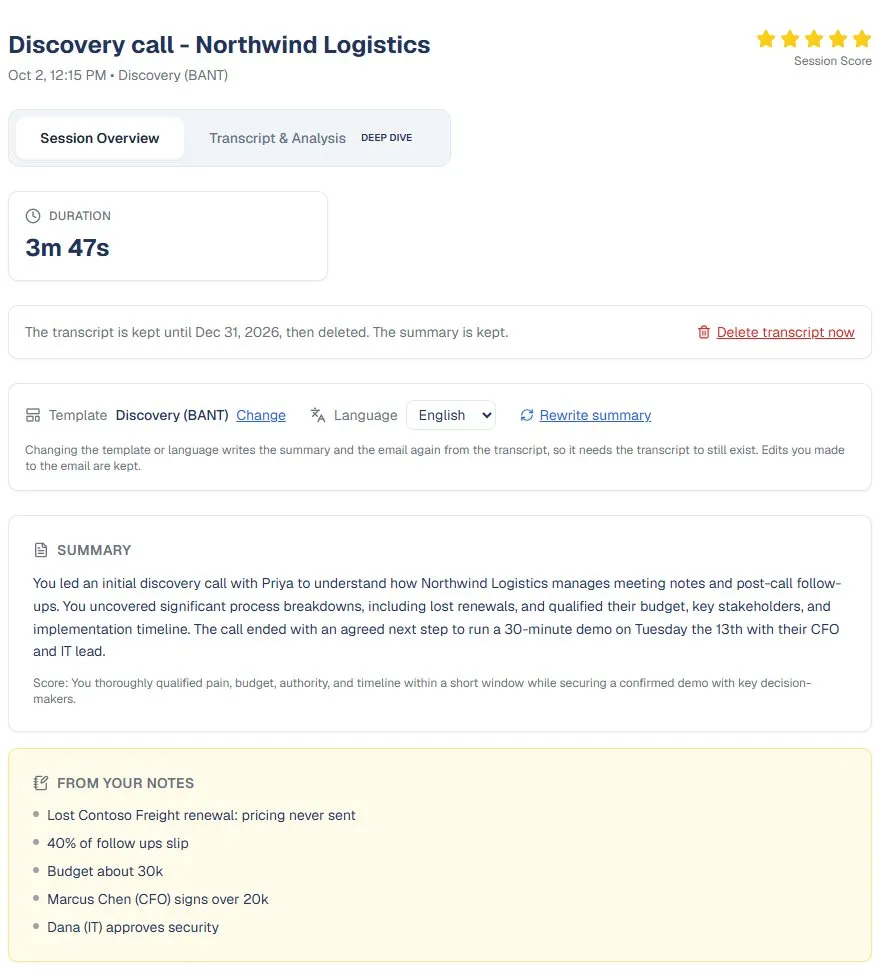
A summary that fits the meeting
A sales call gets pains and qualification gaps. An interview gets evidence per competency, the gaps, and a recommendation. Your own notes are reflected in it, in English or Spanish.
- Agenda coverage, decisions, and action items with owners
- Your notes shown visibly in the summary, not lost beside it
- Rewrite it under a different template or language at any time
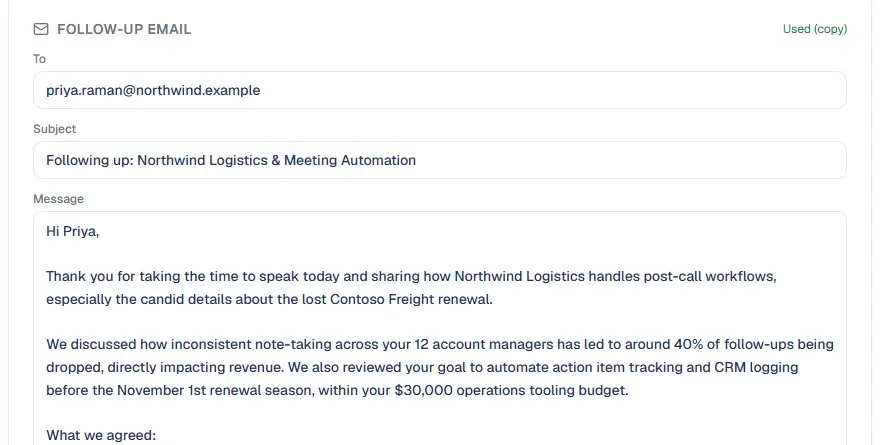
Agreements and next steps, in the follow-up
The email draft goes to the calendar attendees, with what was agreed and who does what next assembled from the tracked lists. Copy it, open it in your mail app, or send it to yourself. Nothing is sent unless you choose.
- Addressed to the people on the invite
- Agreements and next steps with owners, built from the lists
- Edit it, then send it from your own mail
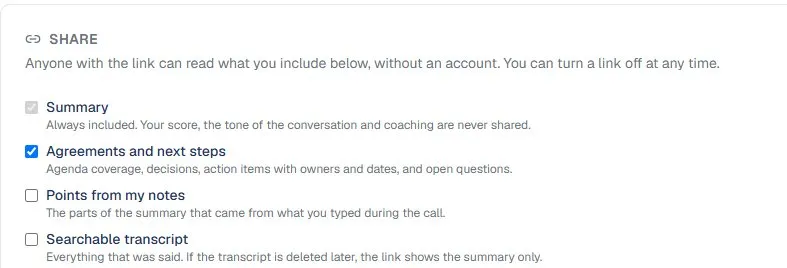
Share it, or send it to your CRM
A share link needs no account, and you choose what it shows. Your score, the tone of the call and coaching are never included. Or send the summary and action items to your CRM as a note on every contact whose email matches an attendee.
- Links that expire, and that you can turn off at any time
- An optional searchable transcript
- One CRM note per meeting, updated rather than duplicated
No Bot in the Call. Nothing Hidden.
SmartCues never joins your meeting, so it asks you to be open about it.
You tell the others first
Before a call is transcribed, you say how you told people, and SmartCues records it. It is enforced by the service itself, so no entry point can skip it.
On the desktop app, your audio never leaves your computer
By default the Windows app transcribes the call on your own computer and saves the recording there too. Nothing is uploaded unless you choose it, and audio never passes through our servers while the call runs.
You decide where everything is kept
For the audio, the transcript and the summary, pick one: on your computer, in your account, or never kept. Transcripts in your account are deleted 7, 30, 90 or 365 days after the call, or never. We never use your content to train AI models.
Read the details in our Privacy Policy.
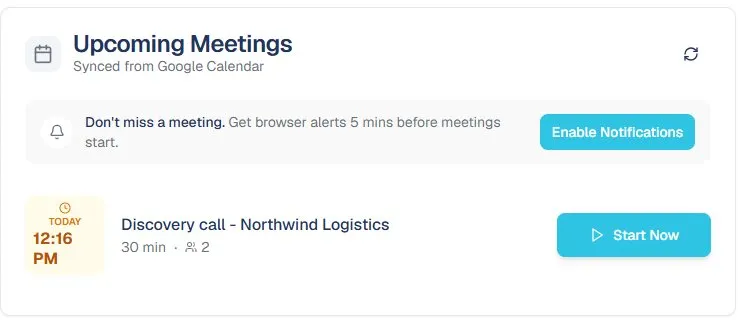
Ready when the meeting starts.
Connect Google Calendar or Microsoft 365 and SmartCues reminds you before each meeting, with a Start button. The Windows desktop app adds a small floating panel you can tick items off in without leaving the call. It works in the browser too.
- Reminders before each meeting, and one click to start
- Desktop app captures both sides of the call, with speakers told apart
- Floating panel, and a tray icon that is there when you need it
Leave every meeting with the record already written
Free during our launch phase. No credit card, and no bot in your call.